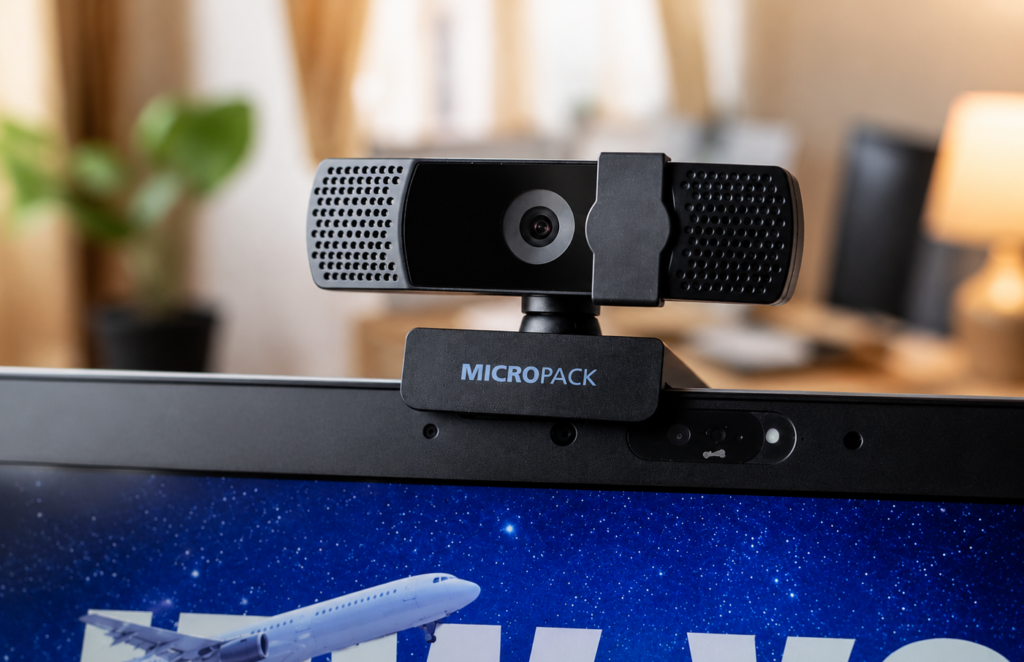
After 25 hours of real meetings, here’s what we learned.
Test Summary
- Product: Micropack MWB-17 Full HD Webcam
- Price at testing: Around ₦30,000 (US$21)
- Test period: 25+ hours
- Meetings: 10+ across Microsoft Teams, Google Meet and Zoom
- Compared against: HP EliteBook 840 G6 built-in webcam
- Overall score: 7/10
Review Status
Last reviewed: July 2026
Last updated: July 2026
This review is based on approximately 25 hours of real-world testing across Microsoft Teams, Google Meet and Zoom. If our experience with the Micropack MWB-17 changes over time, we’ll update this review to reflect it.
Why We Bought It
Remote work has changed the way many of us communicate.
Whether you’re interviewing for a job, joining a client call or attending a team meeting, people see your camera before they hear your ideas.
The built-in webcam on my HP EliteBook 840 G6 did the job… technically. It turned me into a recognisable human being, but not always the version I’d choose for an interview or client meeting.
Instead of reading another review, I bought one.
For around ₦30,000 (about US$21), the Micropack MWB-17 promised Full HD video, a built-in microphone and simple plug-and-play setup.
After using it for more than 25 hours of real work, here’s what stood out.
First Impressions
Setup couldn’t have been easier.
I plugged the webcam into my laptop, Windows detected it immediately, and within seconds it was available in Microsoft Teams, Google Meet and Zoom.
No drivers.
No software.
No firmware updates.
No mysterious “download this utility” pop-ups either, which already puts it ahead of some gadgets I’ve used.
That simplicity is worth mentioning because productivity often comes from removing friction, not adding more software to manage.
Build Quality
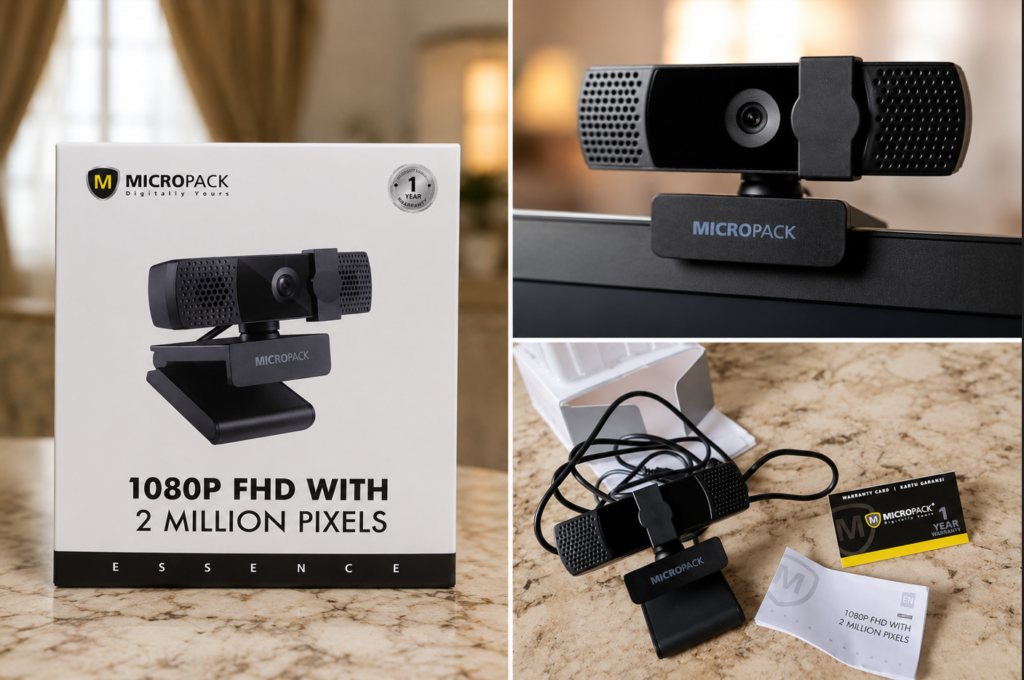
For a budget webcam, the MWB-17 feels better than expected.
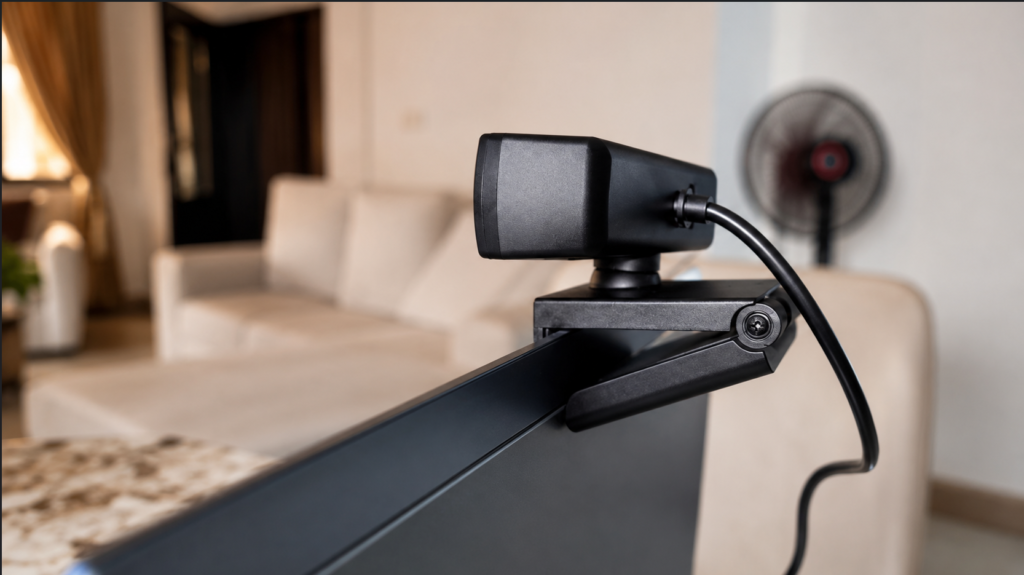
It’s lightweight without feeling flimsy. The adjustable mount grips a laptop securely and didn’t wobble during testing.
One detail I particularly liked was the hinge.
It stayed exactly where I positioned it and made adjusting the viewing angle quick and easy.
I never felt the need for a tripod during meetings.
Real-World Testing
Specifications only tell part of the story.
We wanted to know how the webcam performed during actual work.
Over the course of roughly 25 hours, we used it in:
- Microsoft Teams
- Google Meet
- Zoom
rather than relying on short recording tests.
Image Quality
The Micropack advertises Full HD (1080p) resolution.
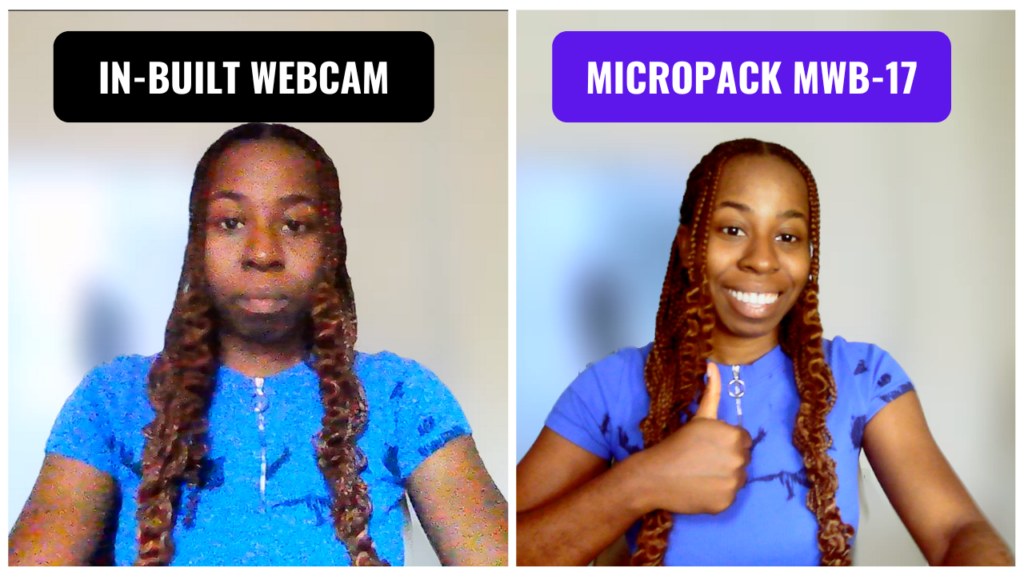
In practice, I’d describe the image as comfortably better than my laptop’s built-in webcam, but not comparable to premium webcams designed for streaming or professional video production.
For meetings, that’s perfectly acceptable.
Faces look clearer.
Colours are generally natural.
The image is soft enough to avoid looking harsh, while still providing enough detail for professional video calls.
If you’re expecting DSLR-quality video, you’ll be disappointed.
Then again, expecting DSLR quality from a US$21 webcam is a bit like expecting a bicycle to win a Formula 1 race.
If you’re upgrading from an older laptop webcam, you’ll likely notice the difference immediately.
Microsoft Teams vs Google Meet vs Zoom
One unexpected discovery was that the webcam didn’t look identical across every platform.
Microsoft Teams
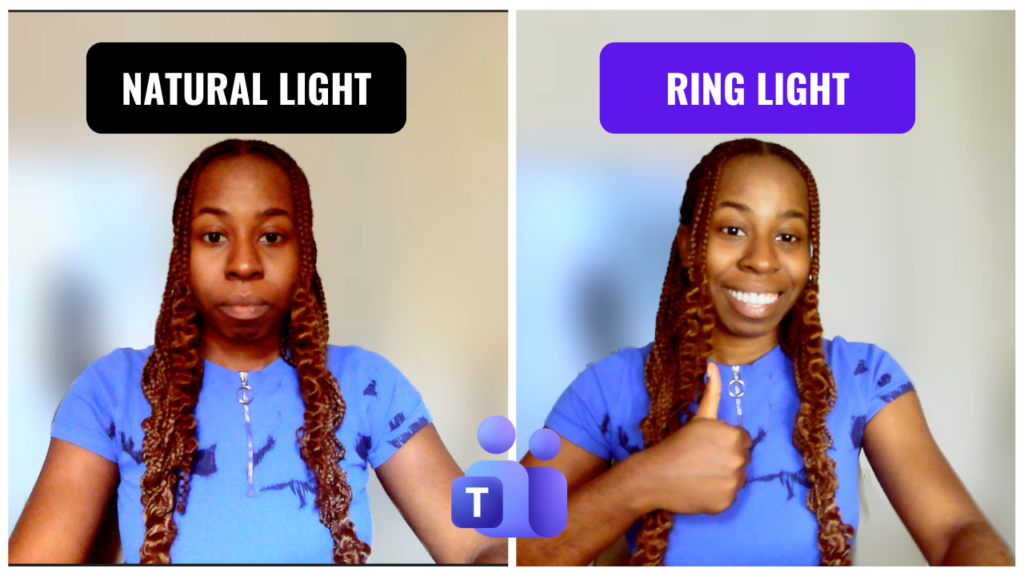
Teams consistently produced the cleanest image during testing.
Skin tones looked natural, and overall clarity was noticeably better.
If these three platforms were judges on a talent show, Teams was definitely the nicest to the webcam.
Google Meet
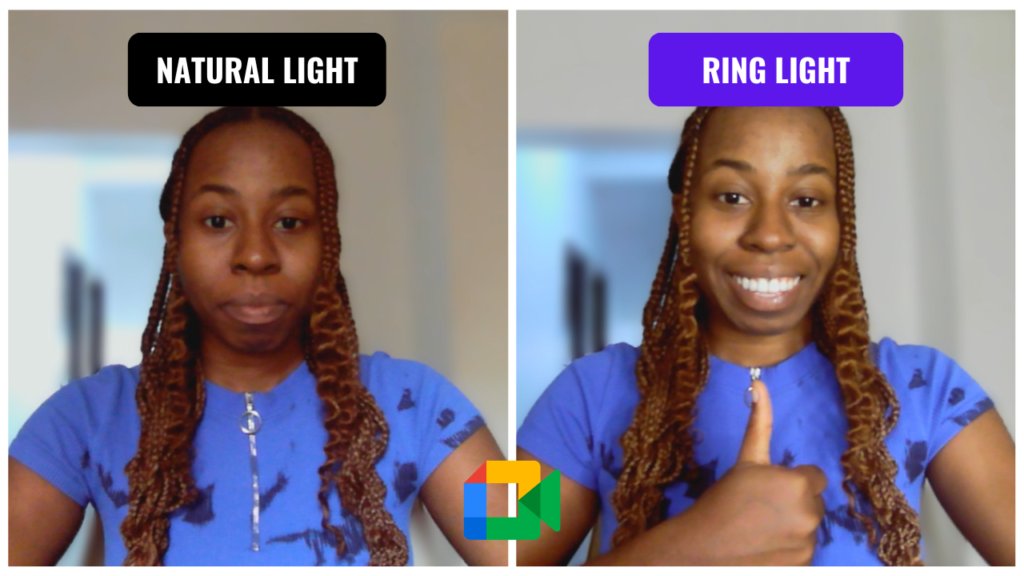
Google Meet performed well, although the image appeared slightly softer than Microsoft Teams.
It was still perfectly usable for meetings.
Zoom
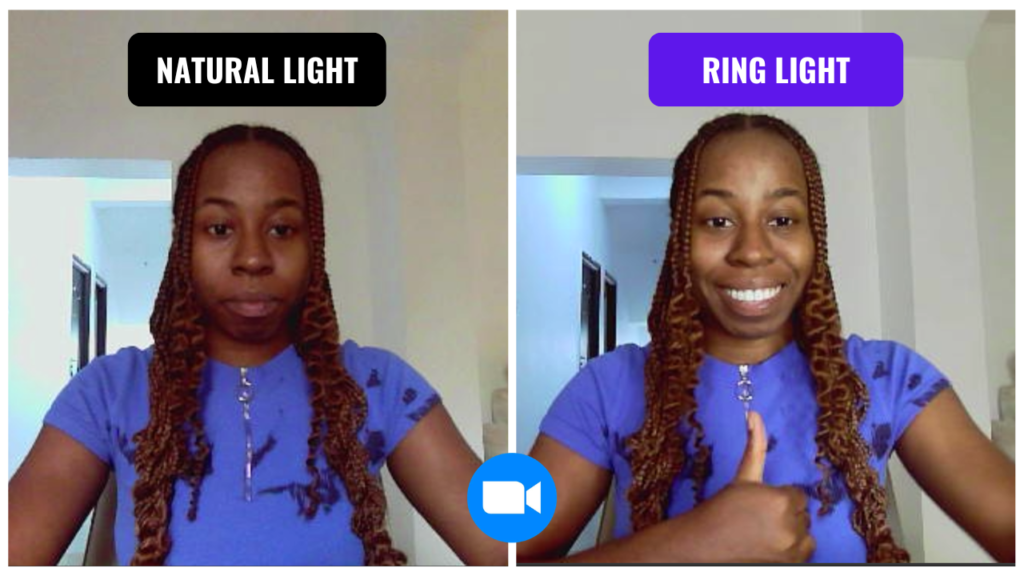
Zoom delivered the weakest-looking image of the three.
It tended to make skin tones appear slightly paler and looked a little softer overall.
The difference wasn’t dramatic, but it was noticeable when comparing screenshots side by side.
Lighting Makes a Bigger Difference Than the Webcam
This was probably the biggest lesson from our testing.
Changing the lighting improved the image more than changing the webcam itself. With only natural daylight, the webcam produced a respectable image.
Adding an 18-inch ring light immediately improved:
- facial detail
- exposure
- colour
- overall clarity
If you’re deciding between buying a better webcam or improving your lighting, don’t underestimate the impact of good lighting.
Sometimes a simple ring light does more for your appearance than spending twice as much on a camera.
Microphone Quality
The built-in microphone ended up being one of the biggest surprises.
I expected it to be “good enough.” Instead, it quietly became one of my favourite parts of the webcam.
Voice quality was clear throughout our meetings, and several calls confirmed that it sounded better than both the laptop’s built-in microphone and a pair of Soundcore earbuds used for comparison.
During testing, keyboard noise was also filtered out well enough that it wasn’t distracting on the other end of the call.
One thing we did notice is that when background noise was present, the microphone occasionally reduced the volume of other participants as it tried to suppress unwanted sounds.
It wasn’t a deal-breaker, but it’s something worth being aware of.
Overall, I’d happily use the built-in microphone for everyday meetings without feeling the need for an external mic.
Reliability
Over more than 25 hours of use, the webcam remained stable.
No disconnects.
No freezing.
No noticeable frame drops.
Which is exactly what you want. The best meeting technology is the kind you completely forget about five minutes into the call.
That level of reliability matters more than an extra specification on the box.
When you’re in an interview or presenting to a client, the last thing you want to worry about is whether your webcam will suddenly stop working.
What We Liked
- Extremely easy plug-and-play setup
- Better image quality than the built-in laptop webcam
- Clear microphone with good background noise reduction
- Stable during long meetings
- Comfortable field of view
- Excellent value for the price
What Could Be Better
No product is perfect.
While the Micropack performed well for meetings, there are areas where higher-end webcams still have the advantage.
- Image softness becomes noticeable compared to premium webcams.
- Low-light performance benefits significantly from additional lighting.
- Zoom’s image processing wasn’t as flattering as Teams during our testing.
That’s hardly surprising. A webcam at this price has to make compromises somewhere, and thankfully it doesn’t compromise where it matters most for everyday meetings.
Who Should Buy It?
This webcam is a great fit for:
- Remote workers
- Students
- Job seekers preparing for online interviews
- Freelancers meeting clients
- Small business owners
- Anyone upgrading from an older laptop webcam without spending a fortune
Who Should Skip It?
If you’re producing YouTube videos, live streaming, recording online courses or need exceptionally sharp image quality, it’s worth investing in a higher-end webcam.
The MWB-17 is built for communication, not content creation.
Final Verdict
One of the ideas we talk about often at Hoardium is that productivity isn’t about chasing the most expensive tools. It’s about choosing the right ones for the work you’re doing.
The Micropack MWB-17 isn’t the best webcam on the market.
It doesn’t need to be.
Most meetings aren’t filmed for Netflix, and most people simply want to look clear, sound professional and get on with their day.
During testing, something unexpected happened.
After a few meetings, I stopped thinking about the webcam altogether.
That might not sound like a compliment, but it is.
Good tools fade into the background and let you focus on the work instead.
For around ₦30,000 (US$21), it delivered exactly what we needed: reliable performance, better image quality than a typical laptop webcam, a surprisingly capable microphone and enough consistency to disappear into the background while we focused on our work.
Sometimes that’s the highest compliment you can give a tool.
It lets you stop thinking about the technology and get back to what matters.
Scorecard
| Category | Score |
|---|---|
| Setup | 10/10 |
| Build Quality | 8/10 |
| Video Quality | 7/10 |
| Microphone | 8.5/10 |
| Ease of Use | 10/10 |
| Value for Money | 9/10 |
| Overall | 7/10 |
A Quick Note on How We Review Products
At Hoardium, we don’t review products after a few minutes of unboxing or by repeating the manufacturer’s specifications. We use them in real workflows, document what we observe, and share both the strengths and the limitations.
Because the goal isn’t to help you buy more technology.
It’s to help you choose technology that helps you do better work.
Because the best productivity tool isn’t always the most expensive one. Sometimes it’s simply the one that gets out of your way.